
Overview
DealRoom is an M&A lifecycle platform designed to manage the deal process from pipeline management and due diligence through post-merger integration.
Rather than moving diligence findings into a separate project management system after close, DealRoom keeps the work in one platform. Diligence requests, documents, findings, and action items can carry directly into integration, giving integration teams a starting point based on work already completed before close.
This continuity helps eliminate a common post-close problem: the diligence tracker gets archived, information is lost during the handoff, and the integration team has to rebuild its workplan. With DealRoom, teams can maintain ownership and context as issues move from diligence into integration.
Key Features
Integration Task Management:
Manage integration tasks, owners, dependencies, deadlines, and workstreams in one place. Timelines automatically adjust when dependent tasks move.Diligence-to-Integration Continuity:
Turn diligence requests, findings, documents, and action items into post-close integration work without rebuilding the plan in another system.Synergy Tracking:
Use DealRoom’s Synergy Tracker to set cost and revenue synergy targets, assign ownership, and monitor synergy capture.Integration Playbooks:
Standardize repeatable processes with post-merger integration playbooks and checklists.Reporting and Dashboards:
Give the IMO and executive stakeholders visibility into integration progress, risks, milestones, and performance.Built-In Virtual Data Room:
Keep deal documents and integration work together with a virtual data room that includes granular permissions and access controls.
Pricing
DealRoom uses subscription pricing based on deal volume rather than the number of users. Plans include unlimited users with no per-document fees.
This pricing structure can be particularly useful during post-merger integration, when teams may need to bring dozens of contributors from HR, IT, finance, legal, operations, and other functions into the process without adding a separate seat cost for each participant.
Pros
- Supports the M&A lifecycle from pipeline management through post-merger integration.
- Connects diligence findings directly with integration work.
- Unlimited users.
- Built-in VDR eliminates the need to transfer deal information into a separate integration platform.
- Accounting and advisory firm Wipfli reports saving around 20 hours per deal.
- G2 reviewers frequently highlight ease of use and responsive customer support.
Cons
- Teams without an established M&A process may need more time during initial implementation and onboarding.
- Some G2 reviewers report that notification settings require adjustment to fit their workflows.
- No free plan.
What Customers Say
There are a lot of different tools such as Outlook, Teams, Sharepoint. but DealRoom is a place where we can go back to and have everything we need in one specific location.

Partnering with DealRoom changed the game for us. Now we can really plan and see where we're falling behind, where you're on track, and what are things that are missing. That's really hard to do without the right tools. Invest in the right tools, like DealRoom, and your deals will flow a lot quicker and a lot easier.


Other M&A management software providers
Midaxo
Midaxo is an M&A lifecycle platform that connects deal sourcing and pipeline management, due diligence, post-merger integration, and value tracking in one system.
For post-merger integration, Midaxo provides structured playbooks, task trees, and cross-functional workspaces for coordinating Legal, HR, IT, Finance, and Operations. Diligence risks, assumptions, and findings can also carry into integration planning, helping teams maintain context as a deal moves from pre-close diligence to post-close execution.
Midaxo separates its post-close capabilities into two connected areas: Integrate (PMI), which manages integration execution, and Track Synergies, which connects synergy initiatives with the original deal thesis and monitors value realization.
Key Features
PMI Playbooks:
Create repeatable Day 1, 100-day, and longer-term integration processes using standardized workflows, checklists, and best practices.Task Tree Management:
Organize integration work into tasks, milestones, owners, dependencies, and functional workstreams.Cross-Functional Integration Management:
Coordinate Legal, HR, IT, Finance, Operations, and other teams within a shared integration workspace.Risk and Issue Tracking:
Maintain centralized risk and issue logs and monitor blockers, changes, and dependencies throughout integration.Synergy Tracking:
Connect synergy targets and initiatives to the original deal thesis and monitor delivery against plan.Dashboards and Reporting:
Track workstream progress, timelines, risks, and value realization through real-time dashboards.Midaxo AI:
Ask questions across project and document data, surface risks and open items, summarize information, and receive suggested updates while keeping final decisions with the user.
Pricing
Midaxo does not publish pricing on its website. Capterra currently lists Midaxo's Basic plan at $10,000 per year, but organizations should contact Midaxo for current pricing based on their requirements.
Pros
- Covers the M&A lifecycle from pipeline management and diligence through integration and value realization.
- Repeatable PMI playbooks and task trees support standardized integration processes.
- Diligence findings and risks can carry into integration planning.
- Dedicated synergy tracking connects post-close initiatives with the original deal thesis.
- AI capabilities can summarize deal information and surface risks and open items.
- Integrates with tools including Microsoft Teams, Outlook, Salesforce, SharePoint, Power BI, and Notion.
- Rated 4.6 out of 5 across 39 reviews on G2.
Cons
- Pricing is not publicly available from Midaxo.
- Some G2 reviewers report limitations around customization and reporting.
- Some reviewers mention challenges with file uploads and managing large amounts of data.
- Organizations that primarily need due diligence and integration functionality may not need Midaxo's broader pipeline and sourcing capabilities.

Devensoft
Devensoft is an end-to-end M&A platform designed to manage deals from pipeline and due diligence through post-merger integration and synergy tracking. The platform includes six integrated modules covering pipeline management, due diligence, post-merger integration, synergy tracking, legal workflows, and reporting and analytics.
For post-merger integration, Devensoft takes a structured, playbook-driven approach. Teams can manage integration projects, coordinate functional workstreams, assign tasks, track risks and issues, and monitor performance from a centralized platform. The software supports both integrations and divestitures and includes preconfigured playbooks and integration templates for creating repeatable processes.
Devensoft reports that customers using its structured approach and playbooks experience 48% shorter integration times, although this is a vendor-reported figure rather than an independently verified benchmark.
Key Features
Integration Project Management:
Manage complex integration and divestiture projects across teams, workstreams, milestones, tasks, and dependencies.Preconfigured Playbooks:
Standardize integration processes with reusable playbooks, templates, and workflows.Risk and Issue Tracking:
Identify and monitor risks and issues throughout integration and maintain centralized records of actions and decisions.Synergy Tracking:
Set revenue, cost, and financial synergy targets, monitor actual versus projected value, and track realization timelines.Team Coordination:
Give integration stakeholders a centralized place to manage documents, data, tasks, and communication.Performance Monitoring:
Track integration progress through real-time dashboards, progress reports, and executive reporting.Reporting and Analytics:
Create custom reports and dashboards for integration milestones, KPIs, synergy realization, and executive updates.
Pricing
Devensoft does not publish pricing on its website. Pricing is quote-based, and prospective customers must contact the company for a customized proposal.
Pros
- Covers the M&A lifecycle from pipeline management and due diligence through post-merger integration.
- Purpose-built integration functionality for enterprise and serial acquirers.
- Preconfigured playbooks and templates support repeatable integration processes.
- Dedicated synergy tracking for revenue, cost, and financial synergies.
- Risk, issue, action, and decision tracking.
- Real-time dashboards and customizable reporting.
- Rated 4.6 out of 5 across 12 reviews on G2.
Cons
- Pricing is not publicly available.
- The G2 review base is relatively small, with 12 reviews.
- G2's current category data gives Devensoft lower scores for project management and task management than the M&A software category averages.
- Teams that use a separate external data room may have additional handoff steps between diligence documentation and integration execution.

MergerWare

MergerWare is an M&A execution platform that supports the deal lifecycle from deal flow and due diligence through post-merger integration. Its PMI software is built around a gated execution methodology designed to give integration teams a structured process for managing goals, workstreams, dependencies, risks, and synergies.
For post-merger integration, teams can define goals and charters at the IMO, functional, workstream, and task levels. MergerWare also provides integration playbooks covering Day 1, the first 100 days, Year 1, and beyond, with predefined workstreams for functions such as Finance, IT, HR, Legal, and Tax.
MergerWare states that its approach can accelerate post-merger integration and synergy realization by up to 50%. This is a vendor-reported figure rather than an independently verified benchmark.
Key Features
Phase-Gated Integration:
Structure integration around defined stages, milestones, goals, and corrective actions using a gated deal lifecycle.Integration Playbooks:
Use templates covering different phases of the deal or create and save custom playbooks for future integrations.Goals and Charters:
Define and independently track goals and charters at the IMO, function, workstream, and task levels.Dependency Management:
Use smart scheduling and critical-path tracking to identify dependencies and monitor progress from individual tasks through the overall deal.Risk and Issue Management:
Maintain a multi-level risk and issue register, assign ownership, establish mitigation plans, and track issues through resolution.Synergy Tracking:
Define and monitor cost and revenue synergies, implementation costs, milestones, actual versus target performance, and related KPIs.Dashboards and Reporting:
Monitor integration performance with analytics and reporting from the task level through the overall deal.
Pricing
MergerWare does not publish specific prices on its website. G2 reports that MergerWare primarily uses named-user licensing, with enterprise and volume-based options available for larger organizations. Prospective customers should contact MergerWare for current pricing.
Pros
- Purpose-built for M&A rather than adapted from general project management software.
- Structured, phase-gated approach to post-merger integration.
- Integration playbooks covering Day 1 through longer-term integration.
- Critical-path and dependency tracking.
- Dedicated risk, issue, and synergy management.
- Supports the broader deal lifecycle, including deal flow and due diligence.
- G2 reviewers highlight ease of use, implementation, and customer support.
- Rated 4.8 out of 5 across 5 reviews on G2.
Cons
- Pricing is not publicly available on MergerWare's website.
- The 4.8 G2 rating is based on only five reviews, providing a limited pool of independent user feedback.
- G2 reviewers indicate that automation could be improved.
- A structured, phase-gated approach may be more process than teams need for smaller or less complex integrations.

EKNOW

EKNOW is a modular M&A platform that supports the deal lifecycle from pipeline and deal execution through due diligence, integration, and value capture. Founded in 1998, EKNOW has one of the longest operating histories among the M&A software providers covered in this comparison.
Rather than requiring every organization to use the same workflow, EKNOW lets teams enable the workspaces and modules they need and configure them around their existing M&A methodology. Its tools can support corporate development teams, deal teams, integration management offices, functional teams, advisors, and other participants across distributed M&A programs.
The platform uses a single source of data across its modules, allowing deals, teams, documents, tasks, reports, and other information to remain connected as a transaction moves through the M&A lifecycle.
Key Features
Modular M&A Workspaces:
Enable tools for pipeline management, deal execution, due diligence, integration, value capture, and other M&A functions based on each organization's requirements.Configurable Workflows:
Adapt fields, forms, workflows, reports, dashboards, and other components to an organization's existing M&A methodology.Integration Management:
Manage integration plans, functional workstreams, tasks, actions, issues, risks, milestones, and other post-close activities within the same platform.Centralized M&A Data:
Connect deals, projects, teams, documents, tasks, reports, and other information to reduce duplicate data entry across the M&A process.Dashboards and Reporting:
Track real-time KPIs and metrics at the portfolio, deal, region, functional team, workstream, and site levels, with configurable dashboards and reports.Document Management and Collaboration:
Manage M&A documents with access controls, audit trails, inline viewing and editing, and collaboration capabilities.Dedicated SaaS Environment:
EKNOW uses a single-tenant SaaS model in which each customer operates on a separate dedicated server.Implementation and Support:
Configuration, data migration assistance, training, ongoing collaboration, system administration, and technical support are included with the platform.
Pricing
EKNOW offers four primary bundles designed for organizations ranging from smaller M&A teams to large enterprises. Each is sold for a single flat annual fee.
There are no separate per-user, setup, storage, support, or professional services fees. EKNOW also states that it does not charge based on the number of deals or projects. Exact annual prices are not published, so prospective customers must contact EKNOW for a quote.
Pros
- Supports pipeline management, deal execution, due diligence, integration, and value capture.
- Highly configurable for organizations with established M&A methodologies and complex workflows.
- Modular structure allows teams to enable only the tools they need.
- Flat annual pricing with no separate per-user, storage, setup, or support fees.
- No additional charge based on the number of deals or projects.
- Built-in dashboards, reporting, document management, and collaboration capabilities.
Cons
- Doesn’t have as many features for deal workflow management outside of legal document analysis.
- Still requires legal teams to use other tools for creating requests or team collaboration.
- AI analysis will still need to be reviewed by a lawyer for final decision making.
- No pricing information is publicly listed.

Smartsheet

Smartsheet is a work management platform that combines a spreadsheet-style interface with project management, workflow automation, dashboards, reporting, and collaboration tools.
Although Smartsheet is not purpose-built M&A software, the company offers M&A resources and templates covering activities from due diligence through post-merger integration. Its free M&A templates include integration plans, integration issue forms, project charters, roles and responsibilities templates, and integration scorecards.
For post-merger integration, teams can use Smartsheet to build workstream plans, assign responsibilities, manage dependencies, automate routine workflows, and provide stakeholders with dashboards and reports. However, teams are responsible for configuring and maintaining the M&A-specific processes and data structures they need. Smartsheet is now owned by Blackstone and Vista Equity Partners after an $8.4 billion take-private completed in January 2025.
Key Features
Multiple Project Views:
Manage integration work using grid, table, Gantt, board, card, calendar, and timeline views.Task and Dependency Management:
Assign owners and deadlines, establish task dependencies, identify critical paths, and track milestones across integration workstreams.Workflow Automation:
Automate approvals, reminders, notifications, assignments, and other recurring processes.Dashboards and Reporting:
Build real-time dashboards and reports for integration status, milestones, risks, and other information stakeholders need to monitor.M&A Templates:
Use pre-built templates for integration planning, issue tracking, project charters, due diligence, roles and responsibilities, and integration scorecards.Collaboration:
Share updates, files, comments, and project information with internal and external stakeholders.Integrations:
Connect Smartsheet with business applications including Microsoft Teams, Power BI, Google Workspace, Jira, and Salesforce.
Pricing
Smartsheet's Pro plan starts at $9 per member per month when billed annually and supports up to 10 paid members plus unlimited free contributors. The Business plan starts at $19 per member per month when billed annually, with a minimum of three paid members and unlimited guests and contributors. Enterprise pricing is available by quote.
Because paid membership is priced per user, costs can increase when an integration requires a larger number of people to have full member capabilities. However, Smartsheet's contributor and guest options can reduce the number of paid seats required, depending on how the integration team needs to use the platform.
Pros
- Familiar spreadsheet-style interface.
- Flexible enough to accommodate different integration processes and workstreams.
- Multiple views, including grid, Gantt, board, calendar, and timeline.
- Strong workflow automation, dashboards, and reporting capabilities.
- Free M&A and post-merger integration templates.
- Integrates with widely used enterprise applications.
- Useful for organizations that already use Smartsheet across other business functions.
- Rated 4.4 out of 5 on G2, with more than 22,000 reviews.
Cons
- Not a purpose-built M&A lifecycle platform.
- Teams must configure and maintain their own M&A workflows and data structures.
- Does not provide the same native connection between VDR-based diligence requests, findings, and post-close integration tasks as a purpose-built M&A platform.
- Does not provide a dedicated M&A synergy-tracking system as a native deal object; teams must configure their own approach using sheets, dashboards, and templates.
- Formula-heavy or highly customized implementations can increase the learning curve.
- Costs can increase as more users require paid member access.

monday.com

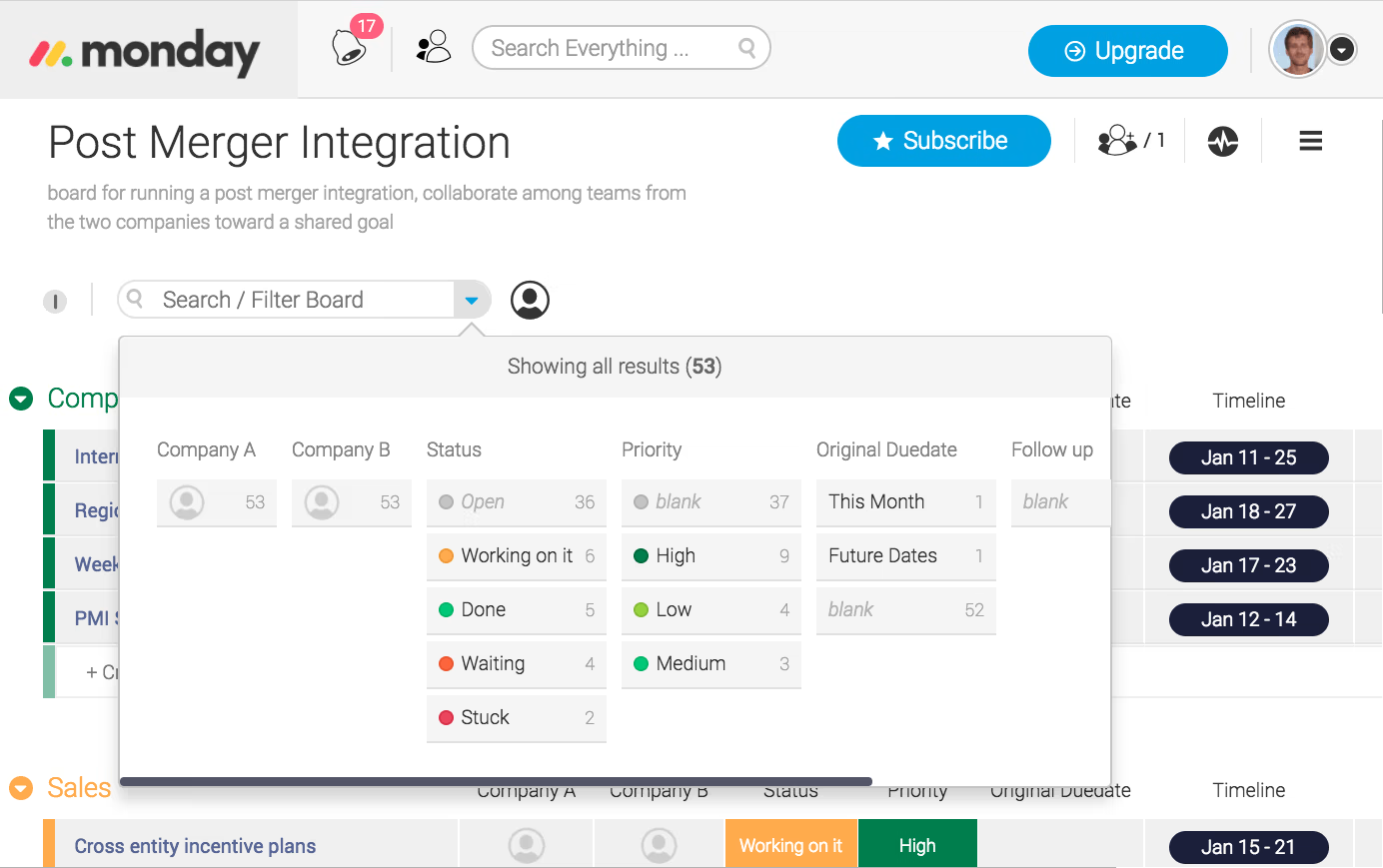
monday.com is a general-purpose work management platform that teams can configure to manage projects, workflows, tasks, and cross-functional collaboration. For post-merger integration, teams can build boards and workflows to assign integration tasks, establish ownership, track deadlines, manage dependencies, and monitor progress across functional workstreams.
Unlike purpose-built M&A platforms, monday.com does not provide native M&A lifecycle functionality out of the box. Teams generally configure boards, templates, dashboards, automations, and other components around their own integration processes. However, monday.com's marketplace does include partner-built M&A solutions for organizations that want more structure without moving to a dedicated M&A platform.
Its flexibility makes monday.com a practical option for smaller or less complex integrations, particularly when an organization already uses the platform elsewhere.
Key Features
Customizable Boards:
Build integration plans around tasks, owners, statuses, deadlines, priorities, milestones, and other custom fields.Multiple Project Views:
View integration work through Kanban, Gantt, timeline, calendar, and other views based on how individual teams prefer to work.Task and Dependency Management:
Assign work to functional owners, establish dependencies, set deadlines, and monitor progress across integration workstreams.Workflow Automation:
Automate notifications, assignments, status changes, approvals, and other repetitive integration tasks.Dashboards and Reporting:
Combine information from multiple boards into dashboards that provide visibility into integration progress, workloads, timelines, and other metrics.Templates:
Start with monday.com's existing templates or build reusable templates to standardize integration processes across projects.AI Capabilities:
Standard and higher plans include AI features that can support workflow automation, task assignment, risk analysis, and reporting.Integrations:
Connect monday.com with other business applications to bring information and workflows into the platform.
Pros
- Flexible and highly customizable for different integration workflows.
- Visual interface with multiple ways to view and organize integration work.
- Strong task management and workflow automation capabilities.
- Dashboards can provide cross-functional visibility into integration progress.
- Reusable templates can help teams standardize recurring integration processes.
- Integrates with commonly used business applications.
- Free plan available for very small teams.
- Rated 4.7 out of 5 on G2, with thousands of user reviews.
Cons
- Not purpose-built M&A software, so teams must configure their own post-merger integration processes.
- Does not natively connect due diligence findings and VDR content with post-close integration tasks in the way a dedicated M&A lifecycle platform can.
- Does not provide purpose-built M&A synergy tracking as a native deal object.
- Advanced automation, integrations, and reporting capabilities may require higher-priced plans.
- Per-seat pricing can become more expensive when large cross-functional integration teams need paid access.
- The platform's extensive customization options can create a learning curve for teams building more complex workflows.
Best Post-Merger Integration Software Comparison Chart
Review all the software solutions we just covered in this convenient table where you can see them side-by-side.
Why Use Post-Merger Integration Software?
Once you've completed a deal your integration team will need to take all that information they gathered during due diligence and create action plans.
There will be many people involved. HR will have their list of tasks. IT will have a list and so will finance. Your IMO will be trying to keep track of each function lead and the progress of each item. All those risks that were identified during due diligence are sitting somewhere on a document or excel sheet that your integration team may not use on a daily basis.
This will only make things more complicated. With post-merger integration software, you can allow your team to do all of these things in one location.
The Struggles of Traditional Post-Merger Integration Processes
Disconnected Work Streams
- HR, IT, Finance, Legal, Operations and other teams may each have their own tracker and project plans. The IMO must manually compile those updates to get a holistic view of integration progress.
Lost Diligence Findings
- Risks and action items uncovered during due diligence can be lost after deal closure. If diligence and integration efforts aren’t connected, teams may be forced to manually re-enter findings or reinvent the wheel on issues already uncovered prior to close.
Unclear Ownership
- When hundreds of tasks are siloed by function, it becomes difficult to see who’s responsible for each activity, what’s overdue, and what downstream tasks rely on it.
Manual Reporting
- IMO leaders can spend hours collecting data and building reports for executives instead of focusing on mitigating risk, removing roadblocks, and advancing the integration.
Difficult Synergy Tracking
- Cost and revenue synergy targets may exist in spreadsheets siloed from the initiatives planned to achieve them. It’s difficult to connect targets to owners, milestones and actual results.Post-merger integration software solves these problems by bringing all activities into one shared platform.
What Do You Gain with Post-Merger Integration Software?
One Integration Workspace
- Centralize workstreams, tasks, milestones, risks, documents and status updates so cross-functional teams and the IMO aren’t working from different data.
Clear Ownership and Accountability
- Assign owners to integration activities, establish deadlines, track progress and quickly see what’s overdue. No more hunting down the latest version of a spreadsheet or integration plan through email.
Seamless Transition from Diligence to Integration
- Capture diligence results, risks, documents, tasks and action items into the integration planning platform so your teams can start working on integration planning activities well before the deal is closed, instead of recreating the diligence work afterward.
Repeatable Integration Processes
- Serial acquirers can build playbooks and templates to scale repeatable processes that have proven successful in the past, but also tailor individual workstreams to fit each unique acquisition.
Better Synergy Visibility
- See cost and revenue synergy targets alongside the initiatives, owners, milestones and results planned to deliver them.
Real-Time Reporting
- Dashboards provide the IMO and exec team visibility into deal progress, risks, dependencies and milestones without another layer of manual status reporting.
What's At Stake Without It?
Missed Integration Milestones
- Tasks and dependencies managed in siloed systems can cause delays that go unnoticed until they impact other areas of work.
Lost Deal Knowledge
- Data collected during diligence falls into limbo during handoff to integration. Post-close teams are left wondering about the reasoning for unknown risks, commitments and decisions.
Synergies That Are Hard to Measure
- Without diligence data housed in a centralized system, teams may know what the synergy number is but have no visibility into where it’s coming from.
Inconsistent Execution Across Deals
- Repeat acquirers who recreate their integration process from scratch with every deal miss the opportunity to standardize processes and learn from past integrations.
Reduced Visibility for Leadership
- When integration information lives in spreadsheets, email threads and project management software, it's difficult for executives to see a real-time view of where integration stands in terms of progress, risk and value capture.
- Post merger integration software doesn't substitute for a solid integration plan. Rather, it empowers teams to carry out that plan with clear ownership, connected information and increased visibility from diligence through value realization.
Post-Merger Integration Software vs. Project Management Software
Post-merger integration software is built around the M&A process itself. Rather than building an integration workflow in a blank project management environment, deal teams have tools and frameworks designed specifically for the journey from diligence through integration and value realization.
Built for M&A vs. Built for General Project Management
- Project management software is built to facilitate all kinds of projects, whether that’s marketing campaigns, product launches, etc. While that flexibility is helpful, it also means you’ll have to configure your platform to your integration methodology as a merger and acquisition (M&A) team.
Purpose-built M&A software is built around the deal process. That can involve diligence management, integration playbooks, functional workstreams, risks/issues, synergy tracking, executive reporting and more depending on the platform.
Diligence-to-Integration Continuity Tools
- One glaring contrast shows up when transitioning from due diligence to integration.
With basic project management tools, teams might need to export diligence data, risks, docs and action items into a separate integration project manually. That means teams need to manage another handoff just when they’re gearing up for Day 1.
M&A lifecycle platforms help connect these phases. DealRoom, for example, enables teams to bring diligence insights into post-merger integration instead of recreating the integration plan from scratch at close.
M&A-Specific Playbooks and Workflows
- A project management platform allows you to construct a workflow. Integration software can offer the workflow itself.
Platforms built specifically for M&A may come with reusable integration playbooks, Day 1 and 100-day plans, functional workstreams, integration milestones, risk registers and more. They’re built with acquisition execution in mind. If your company is a serial acquirer, you can standardize and tighten these processes deal after deal.
Synergy and Value Tracking
- Legacy project management solutions excel at answering questions like: Is this task complete? Who owns it? Is it past due?
Post merger integration teams ask additional questions, most importantly: Is this acquisition realizing value as we anticipated?
Platforms built for managing synergies allow teams to link synergy targets to initiatives, owners, milestones and actual results. While a traditional project management tool can typically be customized to store this data, it would likely fall on the teams themselves to build and maintain that framework.
Which Type of Software Do You Need?
- Project management software may suffice if you have simple integrations, already have a clearly defined PMI process, and simply need to coordinate tasks, deadlines and people across the deal.
Post-merger integration software makes more sense if you’re doing complex or frequent deals, need to link diligence with post-close execution, want to standardize integration playbooks across the organization or simply need deeper visibility into risks, dependencies, synergies and value realization unique to PMI.
Especially for serial acquirers, the decision becomes less about whether or not your project management tool can track integration tasks and more about how much M&A-specific infrastructure your team has to build and maintain on its own.
Key Features of Post-Merger Integration Software
- Diligence carryover. The single most valuable question you can ask any vendor: what happens to diligence findings after close? Risks, commitments, documents and action items identified during diligence should flow directly into the integration plan. If the answer requires exporting to Excel and recreating the workplan, the tool is creating the very handoff gap it purports to fix. Our M&A integration playbook covers how to structure that handoff.
Integration playbooks. Standard integrations are more than a blank task list. Search for platforms with reusable playbooks that allow teams to standardize Day 1, 100-day and longer-term integration plans by function or workstream. The best platforms provide teams with a proven starting point and flexibility to tailor the plan to the deal instead of rebuilding the integration process each time.
Dependency management. Rarely does an integration activity take place in isolation. An IT migration may be dependent on an access decision, which is dependent on an HR milestone, which may be waiting on legal approval. Software should expose these relationships, flag delays and illustrate how a change to one activity impacts downstream activities. Task tracking shows you something is behind schedule; dependency management tells you what that delay is jeopardizing.
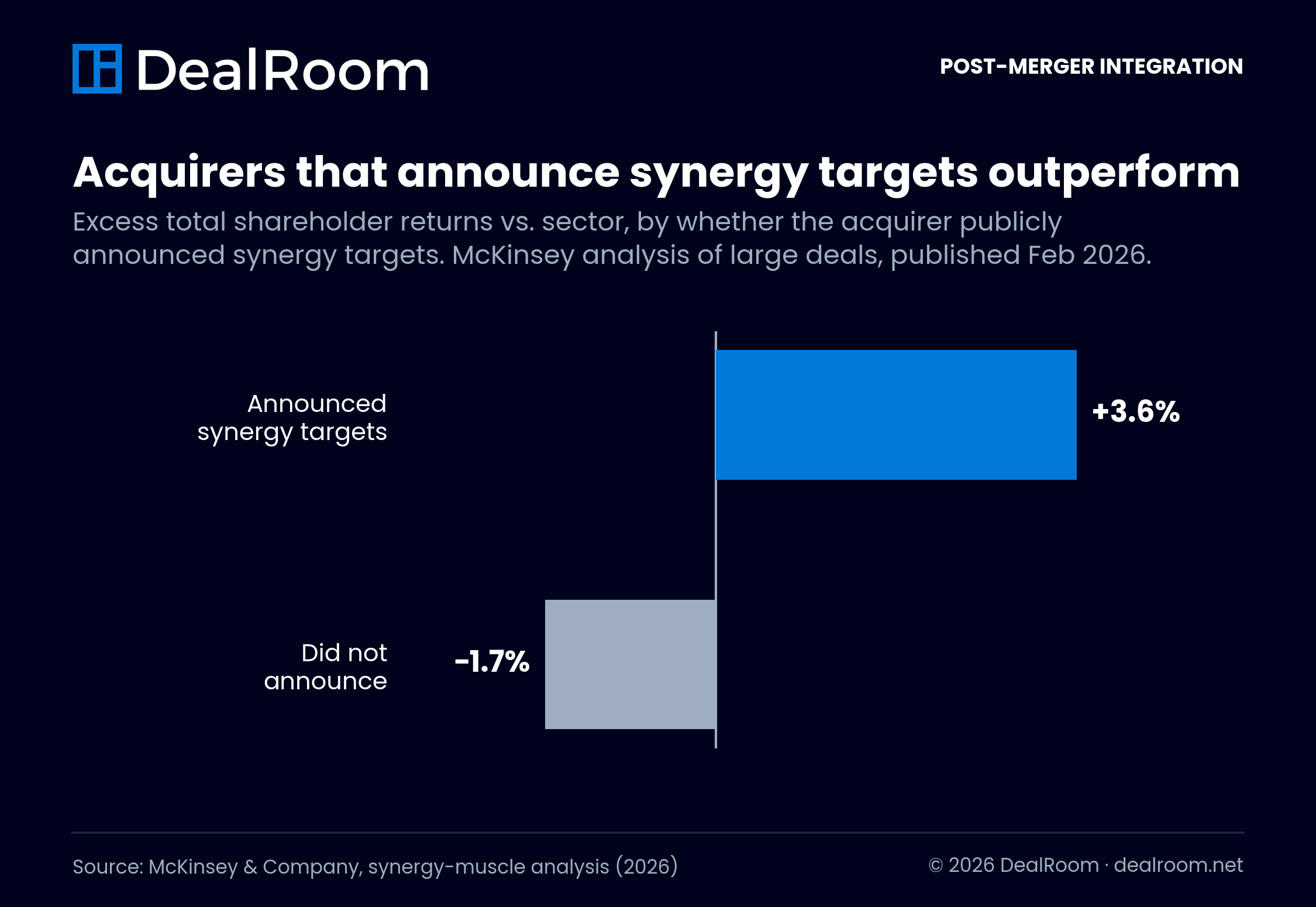
Synergy tracking as a first-class object. McKinsey recently reported that announced cost synergies for 2024 and 2025 deals are running at levels far above the historical average of approximately 16% of the target’s cost base. Goals that lofty require per-initiative owners, baselines, and capture reporting, not “totals” row in a spreadsheet. At minimum, you need a synergy tracking template. Ideally, you’d have a synergy tracker that works in real time.
Risk and issue management. Integration teams should have a system in place to track and manage risks and issues across workstreams. Look for centralized registers with defined owners, severity/priority ratings, due dates and resolution status. Ideally, risks raised during diligence should roll into the integration environment to maintain context through close.
Reporting the executive team will actually read. As deal volume is anticipated to increase (79% of executives expect an increase in deal volume, according to Deloitte’s 2025 M&A Trends Survey), boards are demanding more frequent updates on integration. Demand for live dashboards as opposed to static status decks will increase. Access to real-time updates on milestones, outstanding work, major risks, synergy capture, and other pivotal integration metrics should be readily available to executives, removing the bottleneck of the IMO creating another presentation.
Cross-functional collaboration. Integration also brings together people who might not normally operate in the same silo, such as corporate development, HR, IT, finance, legal and operations. Ideally the platform provides these groups a shared workspace to collaborate on tasks, documents, comments, updates and decisions. Features like notifications and clear ownership are important, but collaborative features should facilitate work, not overwhelm the occasional contributor with alerts.
Permissions and security. Due to the sensitive nature of financial, employee, operational and strategic information involved in M&A integrations, it's important to look for granular permissions that allow administrators to dictate who can access specific documents, workstreams or deal data. Audit trails, secure document management and predefined security controls are critical if the platform will also contain due diligence data.
Pricing that matches how integration teams work. Integrations teams draw from many ad hoc contributors across HR, IT, finance and operations. Seat licenses quickly escalate costs as each additional stakeholder requires full access. Consider pricing based on realistic counts and roles of actual users, beyond the primary IMO members. Plans with unlimited users, deal-based pricing or flat fee models can better accommodate larger groups involved in integrations.
A defined process to run. Software can’t save an undefined process. Playbooks, dependencies, risk registers and dashboards are only effective if the team has already decided how they’ll make decisions, who owns each workstream and what success looks like. If you’re setting up your first integration management office, start with our post merger integration process guide before choosing a tool.
How to Choose the Right Post-Merger Integration Software
- The correct platform depends on how your team currently handles acquisitions, where the biggest bottlenecks are and how much of the M&A lifecycle you want one system to touch. Don't compare feature lists before mapping the software to how your team really works.
Decide whether you need PMI-only or full-lifecycle M&A software. Should you find yourself struggling only with the alignment of post-close activities, a standalone integration tool or configurable project management platform may suffice. However, if you handle pipeline, due diligence and pre-close planning as well, look for a full-lifecycle M&A platform. Maintaining connectivity between these phases cuts down on handoffs and allows data discovered throughout the deal to follow the team into integration.
Map your current diligence-to-integration handoff. What happens to diligence findings, risks, documents and action items at deal close? Are they get manually entered into a new spreadsheet? Does your integration team have to review diligence docs a second time to create its workplan? Look for software that eliminates these steps rather than simply digitizing them.
Count your occasional users, not just your core deal team. While the IMO may be small, there may be two dozen or more people from HR, IT, finance, legal and operations who help with integration. Identify who needs full access vs. who just needs to update the work assigned to them. How often will each group access the platform? Weigh your group's needs against per-seat pricing, unlimited-user plans and flat fees.
Identify your reporting requirements. Consider the questions that the executives and workstream leaders need answered. This can include if Day 1 activities are staying on track, which milestones are delayed, where risks are escalating and if expected synergies are being realized. Look for tools with dashboards and reports that will answer those questions without having the IMO having to export data and manually create status decks.
Assess how much configuration your team can support. While a configurable platform can mold to your existing integration process, that configurability also needs to be built and managed by someone. Teams without administrators may benefit more from workflows built for a specific purpose and out-of-the-box integration playbooks. Consider not only setup time, but also the overhead to configure the platform from deal to deal.
Test the platform against a real integration workflow. Even the slickest demo can’t demonstrate how the software will behave during a real integration acquisition. Place vendors in the driver’s seat and walk them through an actual use case from your workflow. Identify a risk found during diligence, convert it to an integration task, assign responsibility, link to dependent tasks, escalate as an issue and feature its status in an executive dashboard. If your team needs to export data, re-key information or otherwise workaround to complete that exercise, those problems will be magnified during a real-world integration.
It’s not about finding the platform with the longest list of features. It’s about finding one that eliminates friction from your existing M&A process and provides your integration teams a straightforward path from diligence insights to post-close execution.
Frequently Asked Questions
What does post-merger integration software do?t
- Post-merger integration software gives the integration management office one system for workstreams, tasks, dependencies, synergy targets, risks and status reporting after a deal closes. The stronger platforms also connect that work back to due diligence, so findings from before close become the integration workplan instead of being rediscovered months later.
How is PMI software different from regular project management software?
- Generic project management tools like Smartsheet and monday.com track tasks but have no concept of deals, diligence requests, synergies or deal-stage gates. PMI platforms model those objects natively. The practical difference shows up at handoff points: a purpose-built tool carries diligence findings into integration automatically, where a generic tool requires manual rebuilds.
How much does post-merger integration software cost?
- General-purpose tools start around $9 to $19 per user per month. Purpose-built M&A platforms are typically annual subscriptions: Capterra lists Midaxo starting around $10,000 per year, while DealRoom prices by deal volume with unlimited users. For a cross-functional integration involving dozens of contributors, unlimited-user models usually cost less than per-seat tools at scale.
HWhat features should post-merger integration software have?
- Look for features like integration playbooks, task and dependency management, risk and issue tracking, synergy tracking, dashboards and reporting, collaboration tools, and granular permissions. If seeking one platform to use across the M&A lifecycle, look for due diligence management functionality as well as the ability to carry findings, documents and action items directly into integration.
When should integration planning start?
- Before the deal closes. Integration planning should begin during due diligence, when the team still has access to the target’s data and the standing to ask questions. Teams that wait until close start the clock with a blank workplan and a diligence tracker nobody looks at again. That is the handoff failure that purpose-built platforms exist to prevent.
Who uses post-merger integration software?
- Typically, the integration management office will own the platform, but usage of PMI software spans the organization.Corporate development, HR, finance, IT, legal, operations and many functional teams can own integration workstreams or even individual tasks. The wide variety of users makes usability, permissions and pricing structure especially critical.
How does post-merger integration software help track synergies?
- PMI software can tie individual cost and revenue synergy initiatives to targets, owners, milestones and actual results. This allows greater visibility for the IMO and leadership into if the expected value is being realized and which initiatives are ahead of or behind schedule.
Can you run post-merger integration in Excel or Smartsheet?
- You can. Many teams do. It works while the deal count is low and the integration scope is narrow. It breaks when multiple deals overlap, when synergy targets need owners and capture reporting or when executives want live status instead of a weekly deck. Given that 70 to 75% of acquisitions fail to hit their objectives, tooling the integration properly is cheap insurance.
When should a company move from spreadsheets to dedicated PMI software?
- Typically, it becomes clear when deal flow, integration complexity or number of contributors grows. Some warning signs are when there are multiple versions of integration trackers floating around, manual diligence handoffs between teams, challenges tracking dependencies, separate spreadsheets for synergies, significant time spent on status reporting and little visibility into multiple integrations happening at once.
Ready to begin your legal review?
Legal due diligence is one of the most critical steps in closing a deal. Use our free checklist to make sure nothing slips through the cracks.